

Overview
Business Goals in Jobber helps you set meaningful targets for your business and stay on track to reach them. By combining your goals with key data from Jobber, you’ll receive personalized insights and recommendations that make it easier to focus on what matters most—whether that’s growing revenue, improving cash flow, getting more organized, or building a stronger customer experience.
With Business Goals, you can:
- Set and track goals tailored to your business priorities
- Get personalized coaching through simple, actionable recommendations
- Measure progress with benchmarks and key performance metrics
- Stay motivated with monthly Business Snapshots that highlight wins, opportunities, and next steps
This tool acts like a virtual advisor, giving you clarity on where your business is today and confidence in the steps to take next.
Join the Business Goals Jobber Lab
To join the Business Goals Jobber Lab, click the Gear Icon, then select Jobber Labs. Locate the Business Goals lab, then select Turn On to enroll in the Lab.
After joining the Lab, you’ll start the set up process which takes about 3 minutes to complete.
Set your business goals
After you’ve joined the Business Goals Lab, you’ll be asked a few quick questions:
- How do you currently track your business goals
For example, you might use a system and review goals regularly, jot them down informally, or just keep them in your head. - What’s your revenue goal?
Select if this revenue period is monthly or annual, what your target monthly revenue is, and why you chose this number. We’ll track your progress and help you stay on course. - What’s the one thing you’d most like to improve in your business
Options include hitting a revenue target, booking more jobs, getting more organized, building a better customer experience, or planning for growth. - What does success look like to you?
Here, you can describe your goal in your own words (for example, “Hire more staff so I can open a second location”) and choose the date range you’d like to achieve it.
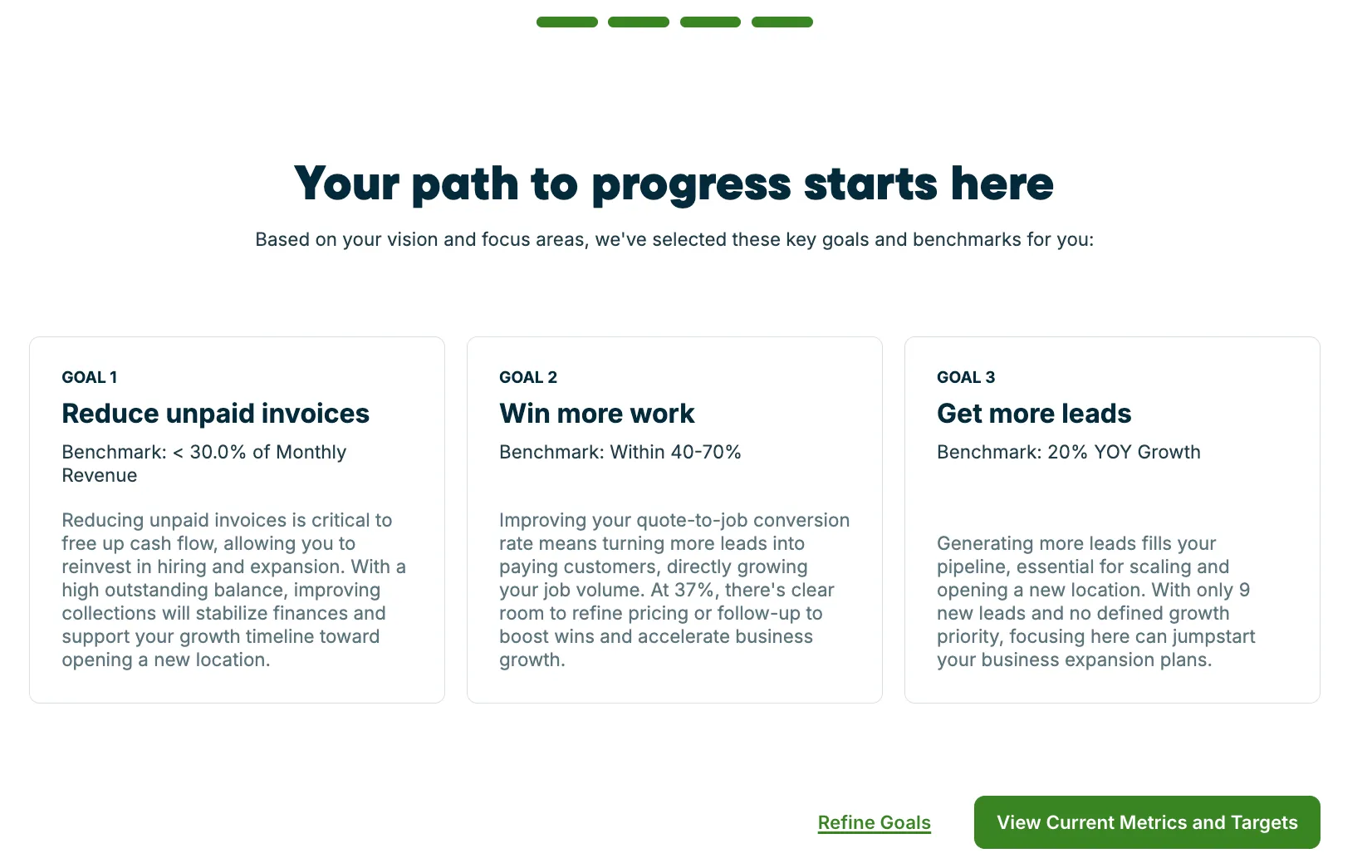
Once you’ve finished the setup questions, Jobber will create a personalized plan that includes:
- Strategic goals aligned to your vision
- Benchmarks to help you measure progress
- Recommendations you can act on right away
From there, you’ll see your goals inside Jobber and can start tracking progress against them.
Where will I see my business goals?
Once you’ve finished setup, your business goals are available anytime from your Insights Dashboard in Jobber.
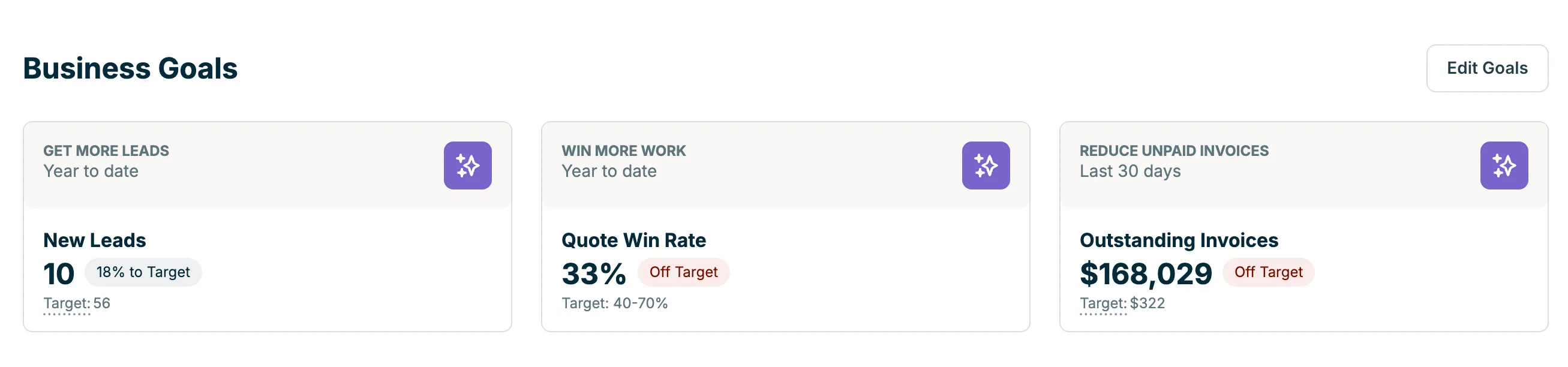
For each of these goals, select the sparkle icon to open a chat where Jobber AI will provide details about your progress towards this goal.
Each cards with your business goals displays:
- Goal name: This is the focus area you selected (for example, Get More Leads, Win More Work, or Reduce Unpaid Invoices).
- Timeframe: Whether the goal is tracked year-to-date or over the last 30 days, depending on the metric.
- Current performance: Your actual results pulled from Jobber (for example, the number of new leads, your quote win rate, or the dollar value of outstanding invoices).
- Progress toward target: A percentage that shows how close you are to meeting your benchmark.
- Target: The standard you’re aiming for (such as 40–70% quote win rate or less than 30% of monthly revenue in unpaid invoices).
- Status indicator: A label like On Track or Off Target that makes it easy to see at a glance whether you’re meeting expectations.
How do I edit my business goals?
You can update your goals anytime from the Insights Dashboard.
- Click Insights from the side navigation in Jobber.com.
- In the Business Goals section, click Edit Goals in the top right corner.
- You will go through the same goal set up questions as when you first set your goals. Fill out the questions with details about what you want to achieve or change from what you’re currently doing.
Review your monthly business snapshot
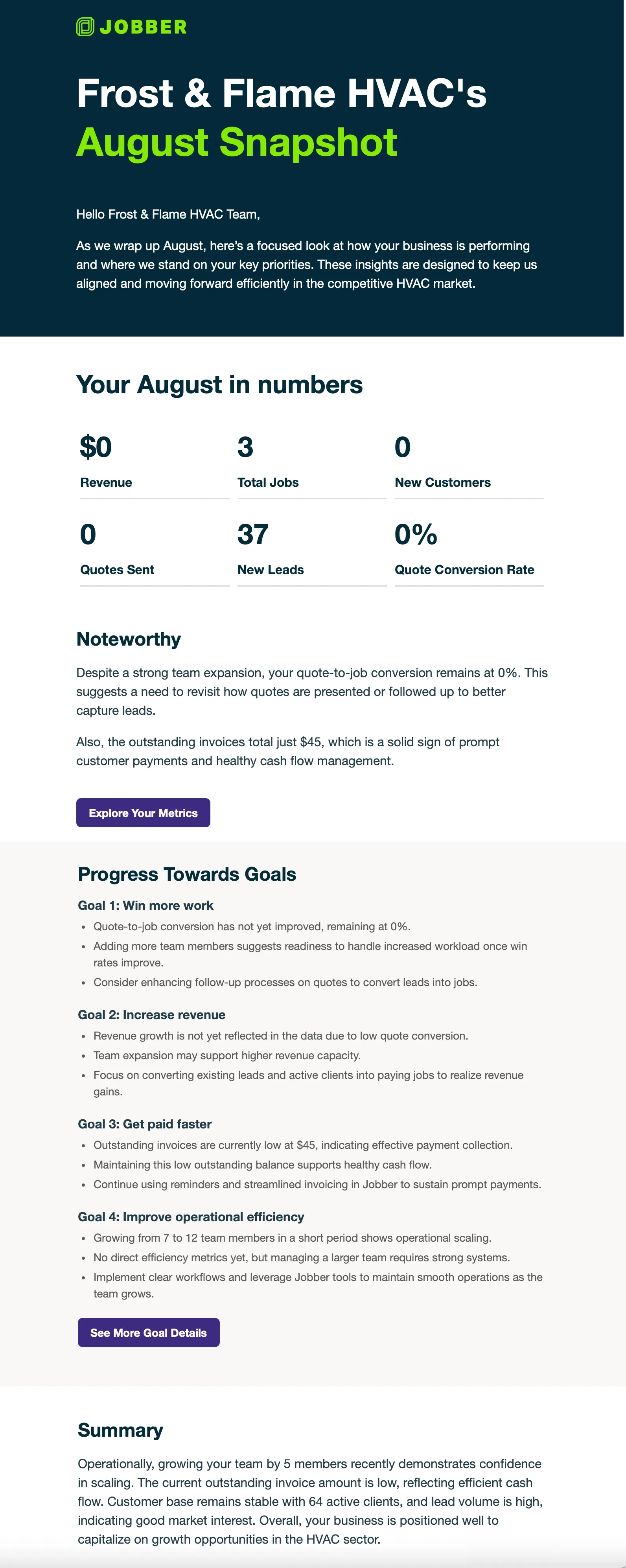
On the first day of each month, the account owner will receive a Business Snapshot by email. This snapshot gives you a clear overview of how your business is performing and how you’re tracking against your goals.
Your snapshot highlights:
- Key numbers including:
- Your revenue as a dollar value
- Total jobs
- New customers
- Quotes sent
- New leads
- Quote conversion rate
- Progress toward each of your goals, so you can see where you’re on track and where to adjust
- Wins and opportunities, calling out what’s working well and where small changes could make a big impact
- Actionable recommendations
Snapshots are designed to help you reflect, course-correct, and plan ahead—keeping your goals front and center each month.
Can I change my goals after setting them?
Yes. You can update your goals anytime from the Insights Dashboard. Learn how to edit your goals.
Will this replace my other dashboards and reports?
No. Business Goals pulls together insights from across Jobber to complement what you already track. It won’t replace anything you already use.
What types of recommendations will I get?
Recommendations may include things like adding deposits to quotes, optimizing job pricing, or improving client communication. They’re tailored to your goals and current business activity.
Who can see my Business Snapshot
Only you (and anyone you chose to share it with). Reports are emailed to the account owner and are not visible to other team members unless forwarded.