

Are you ready to use Jobber to grow your business? Here’s how to subscribe:
- Sign into your account on jobber.com.
- Click the Gear Icon, then select Account and billing from the menu.
- Select View Plans in the Account overview section.
Each Jobber pricing plan has its own user count, card processing fee (for Jobber Payments), and set of features. The trial period has the majority of Jobber’s features enabled for you to experience so you can decide which ones will be most helpful for your business when choosing your plan.
Note: Pricing plans are listed in USD.
There are three ways you can pay for your Jobber plan:
- Monthly: Flexible as you explore what features best fit your business.
- Annual (payment up front): Provides a discount since you’re paying up front.
- Monthly, 1 year commitment: Gives you the benefit of a discount with your payments spread out over 12 months.
If you know you are ready to use Jobber long term, the annual plan or monthly, 1 year commitment are good options since they come with a discount for the year-long subscription.
Once you’ve made your plan selection, click Choose Plan.
Next you’ll be prompted to add your billing details including:
- Payment information
- First name
- Last name
- Credit card number
- Credit card expiry
- Credit card CVC
- Billing address
- Billing email address (this is where you’ll receive your Jobber subscription receipts)
- Country
- State/province
- Street address
- Town/city
- Zip/postal code
If you would like to add the Marketing Suite to your subscription to access Jobber’s Marketing Tools, select Add to Plan. Learn more about Marketing Tools.
Along the side in the summary, you will see the plan you’ve selected as well as any add-ons. This is also where you will select if you will be billed monthly or annually, as well as the date that you will be billed. If your billing address is in a state or province that charges tax on software as a service (SaaS) products, you’ll have sales tax added to your total.
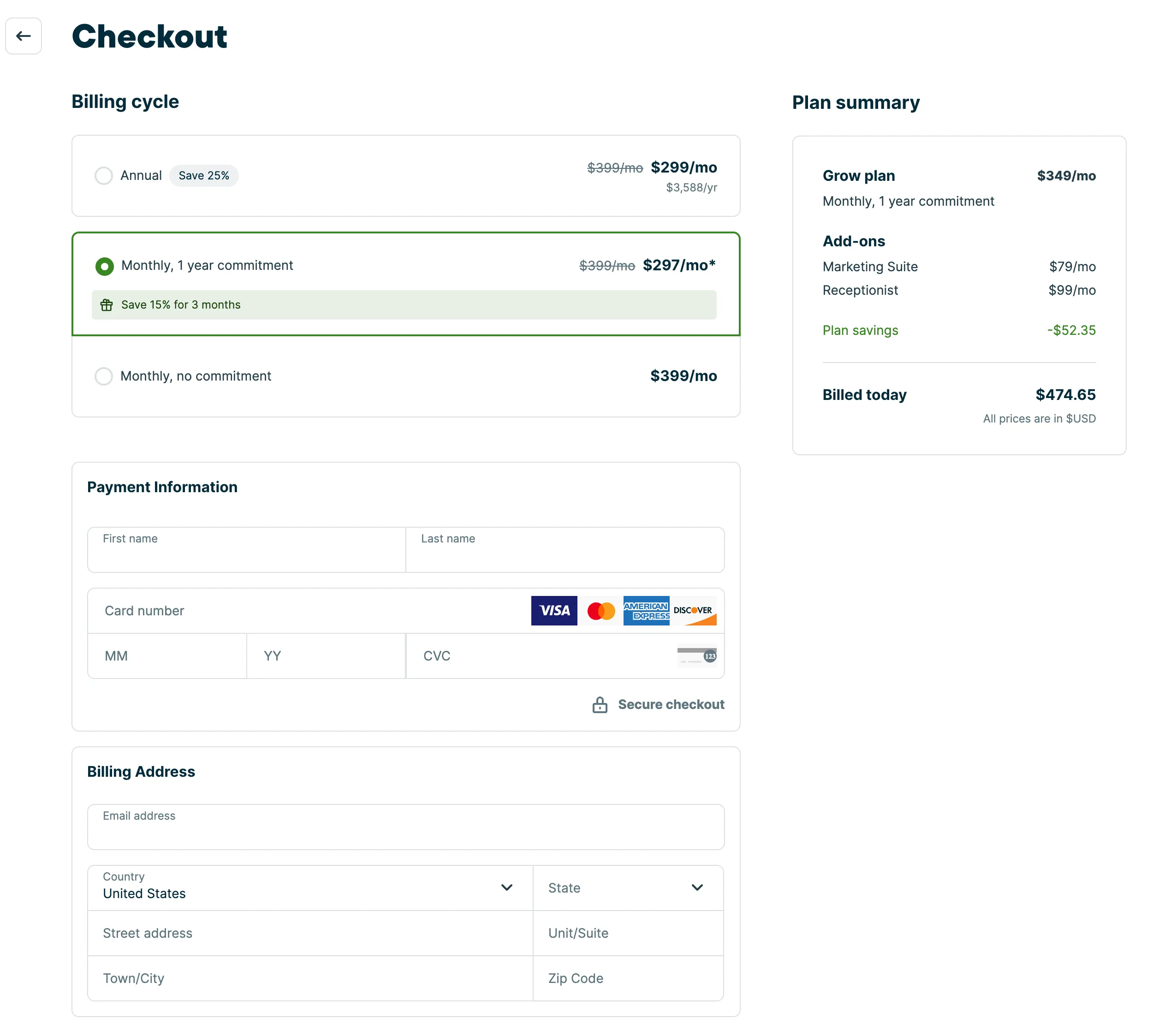
Once you’ve filled out all the fields and made note of the amount you’ll be paying, click Confirm Subscription. By subscribing you are agreeing to Jobber’s Privacy Policy and Terms of Service.
Charges are non-refundable and will automatically renew unless cancelled before the end of the current period.
Your plan, renewal date, and past payments can all be viewed at any time by clicking Settings (Gear Icon), then Account and billing. Learn How to Add or Change Your Billing Information.