

Overview
Customize your communications with specific information automatically.
Variables are a way to fill in the blanks to customize a template message with information relevant to the client you’re contacting. This saves you from having to type out specific details when sending messages, as the variable will populate it for you.
Variables
Variables are available for email as well as text messages. To edit your emails and text messages templates:
- Click the Gear Icon then select Settings.
- From the settings menu, select Emails & Text Messages.
For each template, variables can be inserted to populate the relevant information.
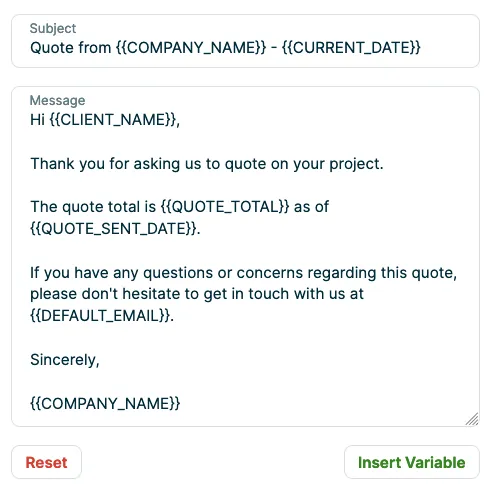
The preview shows what your client sees when they receive the email or text message from you, with the variable populated with information. If you use a variable that isn’t supported or make a typo, the preview will show the variable or incorrect text instead of populating correctly. The preview is a good way to look over what you’ll be sending out, before you actually start sending things out.
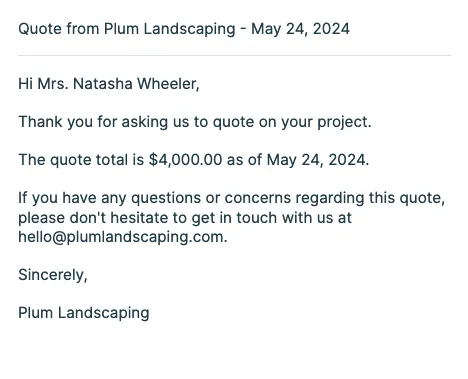
For example, in this email template the {{CLIENT_NAME}} variable populates with the name of the client that this email is being sent to, as well as the quote total and the date the quote was sent.
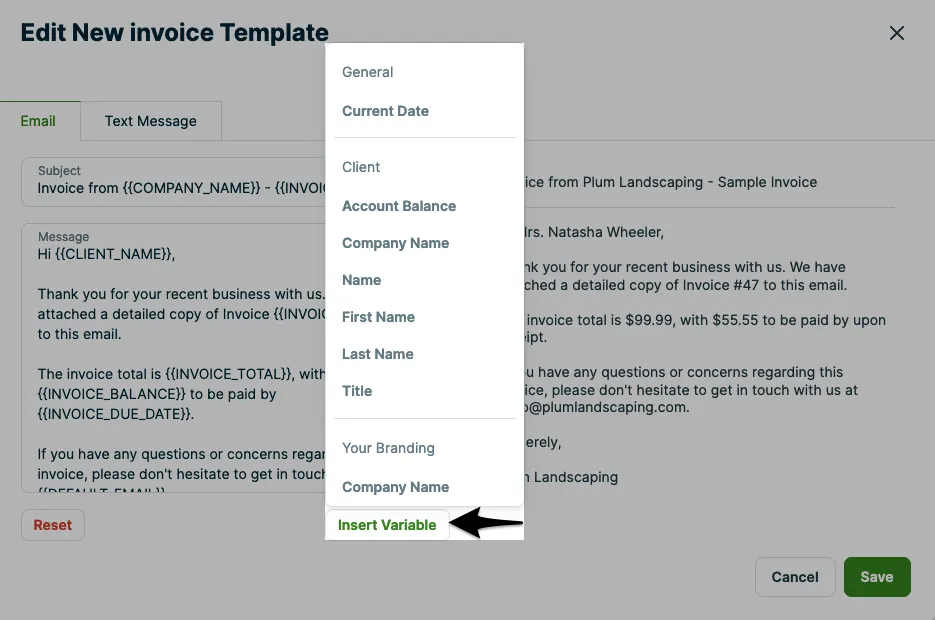
When variables can be added to a message, there will be an option below the message template to Insert Variable. This will insert the variable into your message, then when it’s sent to your client the variable will fill in the blanks with the relevant information.
List of variables
These are the variables that can be added into your communications.
Note: different variables can be used in different messages, not every variable works in every message.
| Variable | Name | What it does | Where you can use it |
|---|---|---|---|
{{ACCOUNT_BALANCE}} | Account balance | Client’s account balance. Note: when this variable is used with invoices, the amount shown is the balance before this invoice is sent. | Quote follow-ups (email & text) Assessment & visit reminders (email & text) Job booking confirmation (email & text) Invoice follow-ups (email & text) Email templates (all) |
{{ADDRESS}} | Address | Populates the address from the quote, including street, city, state, and zip code. | Quote follow-ups (email & text) Email templates (request, quote, and quote approval only) |
{{ARRIVAL_WINDOW}} | Arrival window | Shows the arrival window for a job. | Assessment & visit reminders (email & text) Job booking confirmation (email & text) |
{{ASSIGNED_TO}} | Assigned employee(s) | Assigned employees on a visit. | Assessment & visit reminders (email & text) |
{{CLIENT_COMPANY_NAME}} | Company name | Client’s company name. | Quote follow-ups (email & text) Assessment & visit reminders (email & text) Job booking confirmation (email & text) Invoice follow-ups (email & text) Email templates (all) |
{{CLIENT_FIRST_NAME}} | First name | Client’s first name. | Quote follow-ups (email & text) Assessment & visit reminders (email & text) Job booking confirmation (email & text) Invoice follow-ups (email & text) Email templates (all) |
{{CLIENT_LAST_NAME}} | Last name | Client’s last name. | Quote follow-ups (email & text) Assessment & visit reminders (email & text) Job booking confirmation (email & text) Invoice follow-ups (email & text) Email templates (all) |
{{CLIENT_NAME}} | Client name | Client’s full name or company name. | Quote follow-ups (email & text) Assessment & visit reminders (email & text) Invoice follow-ups (email & text) Email templates (all) |
{{CLIENT_TITLE}} | Client title | Client’s title, such as Mr. or Mrs. | Quote follow-ups (email & text) Assessment & visit reminders (email & text) Job booking confirmation (email & text) Invoice follow-ups (email & text) Email templates (all) |
{{COMPANY_NAME}} | Your company name | Your company name. You can set this in company settings. | Quote follow-ups (email & text) Assessment & visit reminders (email & text) Job booking confirmation (email & text) Invoice follow-ups (email & text) Email templates (all) |
{{CURRENT_DATE}} | Today (day email is sent) | Email sent date. | Quote follow-ups (email & text) Assessment & visit reminders (email & text) Job booking confirmation (email & text) Invoice follow-ups (email & text) Email templates (all) |
{{DAYS_OVERDUE}} | Invoice days overdue | Number of days an invoice is overdue by. | Invoice follow-ups (email & text) |
{{DEFAULT_EMAIL}} | Reply-to email address | Your reply-to email address, as set up under Settings, in Emails & Text Messages. This variable works differently for Campaigns: there it populates the email address set up under Settings, in Company Settings. | Quote follow-ups (email & text) Assessment & visit reminders (email & text) Job booking confirmation (email & text) Invoice follow-ups (email & text) Email templates (all) Campaigns (email) |
{{DEFAULT_PHONE}} | Your company’s phone number | The phone number listed in company settings. | Quote follow-ups (email & text) Assessment & visit reminders (email & text) Job booking confirmation (email & text) Invoice follow-ups (email & text) Email templates (all) |
{{DEPOSIT_AMOUNT}} | Quote deposit amount | Required deposit amount from the quote. | Quote follow-ups (email & text) Invoice follow-ups (email & text) Email templates (quotes, quote approvals, and invoices only) |
{{DISCOUNT_AMOUNT}} | Quote discount amount | Discount offered on the quote, as an amount. | Quote follow-ups (email & text) Invoice follow-ups (email & text) Email templates (quotes, quote approvals, and invoices only) |
{{INVOICE_BALANCE}} | Invoice balance | Balance from the invoice. | Invoice follow-ups (email & text) Invoice email template |
{{INVOICE_DUE_DATE}} | Invoice due date | Date the invoice is due. | Invoice follow-ups (email & text) Invoice email template |
{{INVOICE_NUMBER}} | Invoice number | Number of the invoice. | Invoice follow-ups (email & text) Invoice email template |
{{INVOICE_SENT_DATE}} | Invoice sent date | Date the invoice was sent. | Invoice follow-ups (email & text) Invoice email template |
{{INVOICE_SUBJECT}} | Invoice subject | Shows the subject line from the invoice. | Invoice follow-ups (email & text) Invoice email template |
{{INVOICE_TOTAL}} | Invoice total | Total from the invoice. | Invoice follow-ups (email & text) Invoice email template |
{{JOB_DATE_AND_TIME}} | Job date and time | Job date and time, for example: 29/09/2022 3:00PM | Job booking confirmation (email & text) |
{{JOB_DETAILS}} | Job details | Inserts the property address, start date, and arrival window for the job. For example: Location: 289 NW 198th St / Shoreline, WA 98177 Date: Mar 20, 2023 Estimated Arrival Time: 9:00PM – 10:00PM | Job booking confirmation (email & text) |
{{JOB_FORM_NAME}} | Job form (checklist) name | Name of the job form (checklist). | Job form (checklist) email template |
{{JOB_LOCATION}} | Job location | Job address, for example: 289 NW 198th St / Shoreline, WA 98177 | Job booking confirmation (email & text) |
{{JOB_NUMBER}} | Number | Job identification number. | Visit reminders (email & text) Invoice follow-ups (email & text) |
{{JOB_TITLE}} | Subject | Job title from a quote or job. | Quote follow-ups (email & text) Visit reminders (email & text) Job booking confirmation (email & text) Job follow-up email |
{{PAYMENT_AMOUNT}} | Payment amount | Payment total. | Payment and deposit receipt email template |
{{PAYMENT_OR_DEPOSIT}} | Payment type | Indicates whether the payment was a deposit or a payment. | Payment and deposit receipt email template |
{{QUOTE_CONSUMER_FINANCING}} | Consumer financing | States that consumer financing is available for this quote: “Financing is available, with monthly payments as low as $x.xx* per month. Learn more here.” | New quote (email only) Quote approval (email only) Quote follow-ups (email only) |
{{QUOTE_LABEL}} | Quote label | Your preference for whether quotes are called quotes or estimates on your client documents. | New quote (email & text) Quote follow-ups (email & text) Quote approval (email & text) |
{{QUOTE_TOTAL}} | Quote total | Total amount due on a quote. | Quote follow-ups (email & text) Email templates (quote and quote approval only) |
{{SENT_DAYS_AGO}} | Days ago quote was sent | Number of days ago that the quote was sent. | Quote follow-ups (email only) Email templates (quote and quote approval only) |
{{URL_PLACEHOLDER}} | Client hub link | Inserts a placeholder link to client hub into the text. It looks like https://jbbr.pro/6Z0XZcoNrhH4kvEr9 | Quote follow-up (text only) |
{{VISIT_DATE_AND_TIME}} | Date and time | Displays the visit schedule. | Quote follow-ups (email & text) Assessment & visit reminders (email & text) |
{{VISIT_DATE_IN_WORDS}} | Visit date | Displays the date of the visit in words. Note: this variable does not appear in the preview, but it will populate in the communications. | Assessment & visit reminders (email & text) |
{{VISIT_DETAILS}} | Summary | Displays the date, address, and time of the visit on separate lines. | Quote follow-ups (email & text) Assessment & visit reminders (email & text) |
{{VISIT_LOCATION}} | Service address | Displays the visit service address. | Quote follow-ups (email & text) Assessment & visit reminders (email & text) |
{{VISIT_TIME}} | Time | Displays the start and end time of a visit. | Quote follow-ups (email & text) Assessment & visit reminders (email & text) |
{{WHEN_VISIT_OCCURS}} | Visit dates and time | Inserts the visit date and start time. For example, at 3:00PM on Sept 05 | Assessment & visit reminders (email & text) |
{{WORK_DETAILS}} | Work details | Populates the visit date, property address, and arrival window. For example: Date: Mar 20, 2023 Where: 289 NW 198th St / Shoreline, WA 98177 Estimated Arrival Time: 9:00PM – 10:00PM | Assessment & visit reminders (email & text) |