

Overview
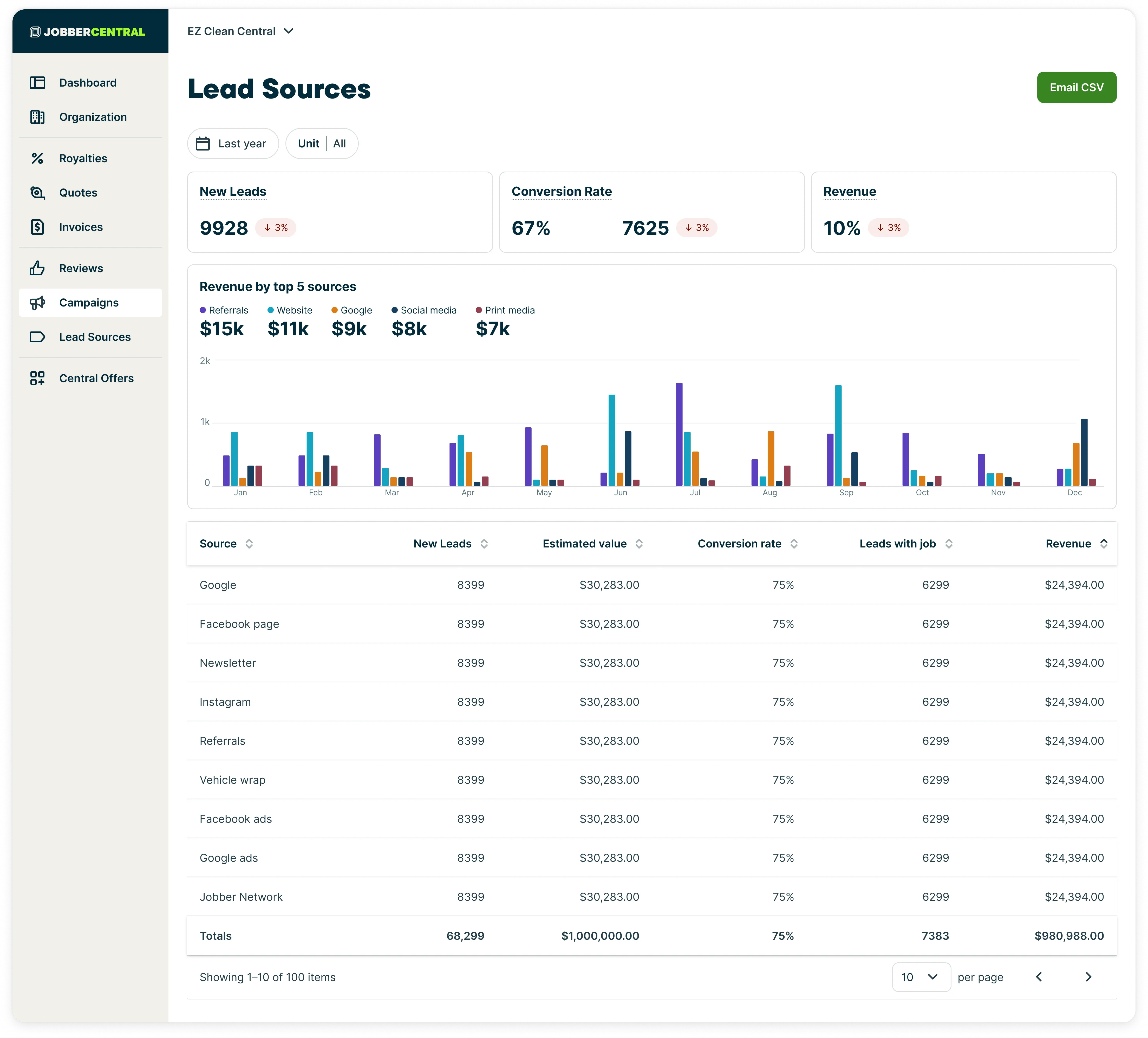
The Lead Sources module in Jobber Central gives you a centralized view of where new customer leads are coming from and how those sources are performing across your entire organization. Instead of reviewing lead data one business unit at a time, you can see lead volume, conversion performance, and revenue by source across your full network.
About Jobber Central
Jobber Central is a centralized experience for managing multiple Jobber accounts. It’s built for Group Service Providers, such as franchises and multi-location businesses, and helps head office teams oversee settings, activity, and performance across their group.
This article is part of a collection that covers Jobber Central features.
By visualizing lead activity across all units, the Lead Sources module helps group operators evaluate marketing effectiveness, compare performance between regions or locations, and make more informed decisions about where to focus time and spend.
When adding or editing a client, there is a field for Lead Source. This is where you can indicate how this customer found your business. The lead source field has dropdown options for:
- Referral
- Flyer
- Vehicle wrap
- Event
- Other
Learn more about lead management
Key metrics
At the top of the lead sources module page, there are cards displaying key metrics across all units. These key metrics include:
- New leads: This is the total number of new leads in this date range with a trend indicator showing a comparison to the previous period.
- Conversion rate: The conversion rate is calculated as leads with a job divided by new leads. This represents how often new leads turn into jobs. There is a trend indicator to show how this compares to your conversion rate in the previous period.
- Revenue: This is revenue by total first invoices issued within this date range. There is a trend indicator to show how this compares your revenue in the previous period.
- Revenue by top 5 sources: This is a breakdown by month showing the revenue that came in from your 5 lead sources with the highest revenue. This includes a month-by-month stacked bar chart displaying how these sources performed.
Filter lead sources
The lead sources module can be filtered by:
- Date range: Select the Date filter dropdown, then select a date range. Your options are:
- Last week
- Last 30 days
- Last month
- This year
- Last 12 months
- All time
- Custom range
- Unit: Select the Unit dropdown, then select:
- All units
- An individual unit
Columns for lead sources
Columns for the lead source table include:
- Source: Where the leads have come from
- New leads: This is the number of new leads created in the selected period
- Estimated value: This is based on request and quote values from new leads
- Conversion rate: The conversion rate is calculated as leads with a job divided by new leads
- Leads with jobs:
- Revenue: This is revenue by total first invoices issued within this date range
- Totals
Export lead source data
To export lead source data for Jobber Central, click the Export CSV button.
A CSV version of the lead sources table will be sent to the same email address that you use when you log into Jobber.
Exporting to CSV is a good option if you need to work with the data in the report, print the report, or share it with someone who is not a user in your Jobber account.