Overview
Jobber add-ons let you expand your plan with tools tailored to your business needs. You can add marketing tools, a receptionist, or a sales pipeline, individually or together, and manage everything from your billing settings.
What add-ons are available
Jobber offers the following add-ons for your subscription:
Business management add-ons
- Receptionist: An AI-powered virtual receptionist that handles client calls and messages when you’re unavailable. Includes 100 conversations per month.
- Sales Pipeline: Track and manage leads from first contact to booked job.
Marketing tools
Jobber’s marketing tools are available through the Marketing Suite, which bundles everything together. To add features to your plan or check what you’re currently on, navigate to the Gear Icon, then select Account and Billing.
Available with Marketing Suite:
Included on all Jobber plans at no extra cost:
Note: Add-ons are not available while in trial.
Add an add-on to your plan
To subscribe to one or more add-ons:
- Log in to Jobber.com
- Select the Gear icon, then navigate to Account and Billing.
- Select Add-ons or scroll to the add-ons section of the page.
- Toggle Add to plan next to the add-on you want, or select Add to Plan on the add-on card.
- Review your plan summary on the right side of the page. Your billing total updates as you make selections.
- Select Continue to Checkout.
- On the checkout screen, confirm your payment method and billing address. Select Edit Payment or Edit Billing to update either.
- Review the amount billed today and your renewal date, then select Subscribe.
Note: Only admin users can subscribe to add-ons.
Your add-on activates immediately after you subscribe. Charges are prorated based on where you are in your current billing period.
Remove an add-on from your plan
You can cancel an add-on at any time from your billing settings.
- Select the Gear icon, then navigate to Account and Billing.
- Find the add-on you want to remove and select Remove.
- Review the cancellation screen. Some add-ons show a prompt highlighting what you’ll lose access to before you confirm.
- Select Unsubscribe to confirm.
Your access to the add-on continues until the end of your current billing period. Charges are non-refundable.
Manage your add-ons and subscription payments
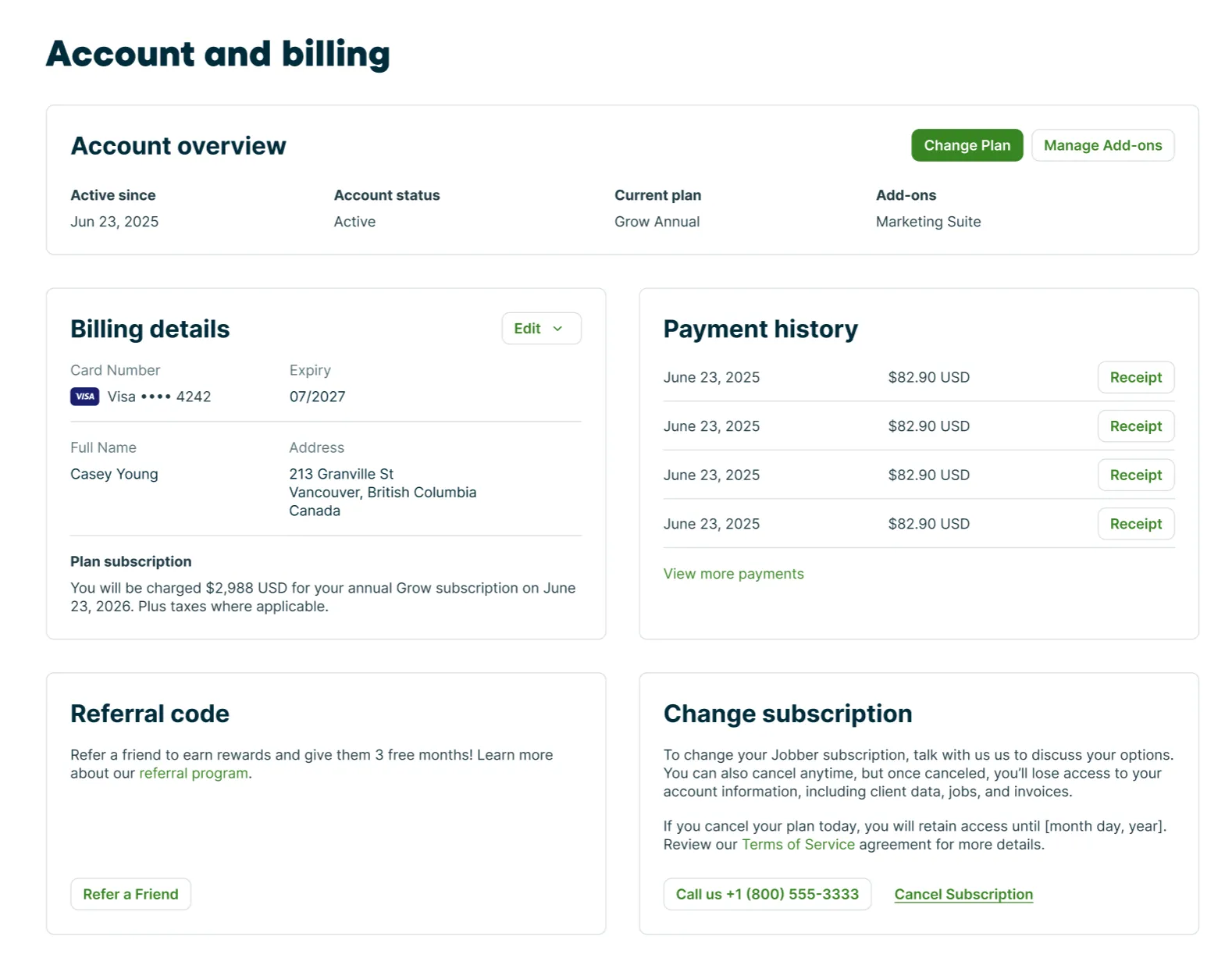
Your subscription and add-ons are managed from the Account and Billing page in Jobber. To navigate to this page, click the Gear Icon then select Account and Billing. Only admin users can access this page.
From this page you can an overview of your billing for your Jobber account including:
- Active since: This is the date your Jobber subscription was started
- Account status: Current status of your Jobber account
- Current plan: The plan you are currently subscribed to
- Add-ons: Any add-ons you have added to your account
- Billing details: This shows the card that is charged for your subscription as well as your billing address. The billing summary shows your upcoming charges with amounts and dates.
- Payment history: This is a history of your payments for your Jobber plan and add-ons. To download the invoice, select a payment from the list.